


Step 1:
Design your landscape in SketchUp Pro or SketchUp Make

SketchUp provides an incredibly powerful design platform for landscape designers and landscape architects. Simply design your landscape using one of the templates included with QuoteMINDER – these templates are used for creating 2D designs within the SketchUp environment in order to draw detailed and accurate landscape designs which quantify the different plants and other items required for installation.
Step 2:
Simply use QuoteMINDER to label the plants and other items on your landscape design.
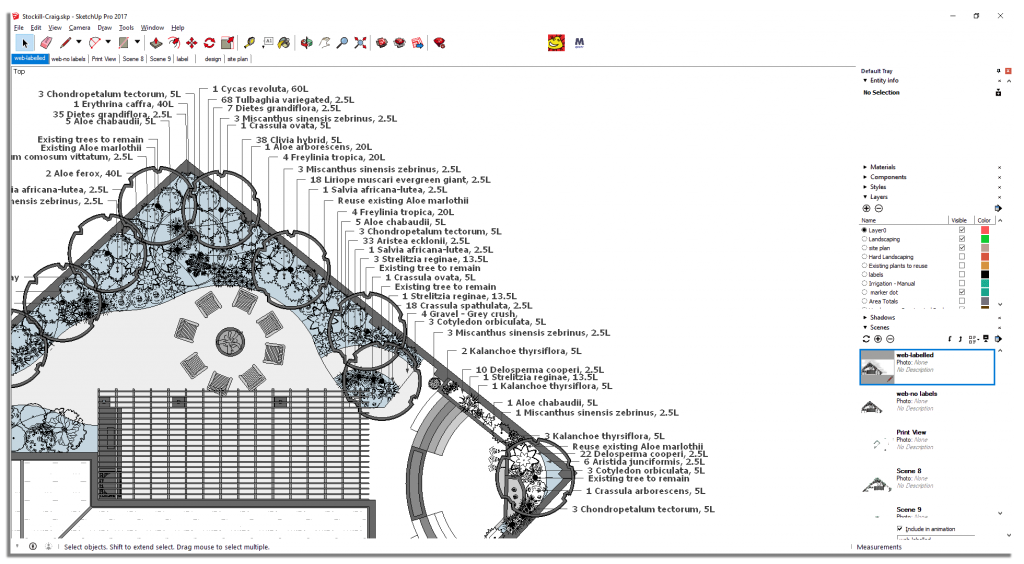
Simply click on the QuoteMINDER plug-in, start typing the name of the plant or other materials that you would like to add to the design, enter the quantity of that product and place your label. QuoteMINDER will keep track of the quantity of each item as well as the area or phase that it has been allocated to. The price, supplier and mark-up percentage for each item is stored in a database within QuoteMINDER and all values can be changed by the user (this feature is password-protected).
Step 3:
Generate your documents!

Use QuoteMINDER to automatically generate documentation based on the labels for plants and other items on your landscape design. This documentation includes:
- Quotations
Includes quotation total for the entire installation as well as totals per area or phase of the project - Supplier orders
Generate all supplier orders or generate an order for a specific supplier - Internal reports
Includes an internal checklist of items to order and an estimated time to complete the landscape installation
The database that QuoteMINDER uses includes the cost price, mark-up, supplier name and other user-defined information which it uses to generate a quotation – this saves you the enormous amount of time and additional work that is usually required to generate a quotation from a drawing. QuoteMINDER also calculates:
- the cost of labor based on user-defined work rates
- transport of a work team to and from site (based on distance to site and vehicle cost per km or per mile)
- delivery costs (based on distance to site and vehicle cost per km or per mile)
- estimated day to complete planting the garden – this is very useful for planning your upcoming installations
All documents are exported in .xlsx format and can easily be branded with your logo as well as information edited or amended. In order to keep control over changes to these documents, all .xlsx files are password-protected.
Free Download
Simply use QuoteMINDER to label the plants and other items on your landscape design.
SketchUp provides an incredibly powerful design platform for landscape designers and landscape architects. Simply design your landscape using one of the templates included with QuoteMINDER – these templates are designed for creating 2D designs within the SketchUp environment in order to draw detailed and accurate landscape designs which quantify the different plants and other items required for installation.
QuoteMINDER saves you the time and additional work that is usually required to generate a quotation from a uses a database of products and plants which the user the SketchUp environment to label the

Available, get it now online!
Sed non mauris vitae erat consequat bibendum.
About QuoteMINDER
Simply use QuoteMINDER to label the plants and other items on your landscape design.
SketchUp provides an incredibly powerful design platform for landscape designers and landscape architects. Simply design your landscape using one of the templates included with QuoteMINDER – these templates are designed for creating 2D designs within the SketchUp environment in order to draw detailed and accurate landscape designs which quantify the different plants and other items required for installation.
QuoteMINDER saves you the time and additional work that is usually required to generate a quotation from a uses a database of products and plants which the user the SketchUp environment to label the
Find your store
Sed non mauris vitae erat consequat bibendum tasociosqu ad litora torquent.

Free Shipping
Sed non mauris vitae erat consequat bibendum tasociosqu ad litora torquent.
